Diaper and Safety Pins: A Practical Guide for Crafting Baby Shower Gifts
If you are looking to add a personal touch to baby shower invitations, nursery decor, or handmade gifts, the Diaper and Safety Pins SVG set offers a versatile solution that bridges the gap between nostalgia and modern crafting. This collection is specifically designed for creators who want to produce high-quality items without getting bogged down in complex design software. Whether you are a seasoned entrepreneur running a small business on Etsy or a hobbyist preparing a gift for a friend, understanding the nuances of this digital asset is crucial for achieving professional results.
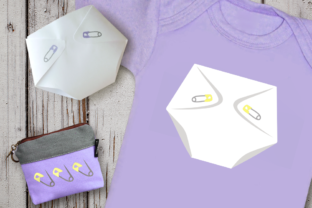
The set includes two distinct versions of a cloth diaper: a 3D folded representation that mimics the shape of a real diaper, and a flat artwork style that works well for icons or patterns. It also features open and closed safety pins that can be used as single elements or combined with the diapers. While these files are powerful tools, many users overlook critical details regarding file formats and machine compatibility, leading to frustration during the cutting or printing process.
Navigating File Formats and Machine Compatibility
One of the most common pitfalls when purchasing digital craft files is assuming all formats work interchangeably across different machines. The Diaper and Safety Pins set comes in SVG, PNG, and DXF formats, each serving a specific purpose. If your goal is to cut designs using a Cricut Explore, Silhouette, Brother, or Graphtec machine, the SVG file is your primary resource. However, simply opening an SVG file does not guarantee success if the layers are not organized correctly within your design software.
Beginners often attempt to use the PNG version for cutting operations. It is important to remember that PNG is a non-cuttable image intended solely for reference and print purposes. Using a raster image like a PNG on a cutting blade will result in wasted material and time because the machine cannot interpret the vector paths required for precision cutting. Similarly, while the DXF format is excellent for software like AutoCAD or specific industrial cutters, it may lack the advanced layering capabilities found in SVGs when used in consumer-grade design spaces.
To avoid these errors, always verify which software you are using before selecting your file. For Cricut Design Space, ensure you upload the SVG directly to maintain editable layers. If you plan to print the design on fabric or cardstock rather than cut it, the PNG version allows you to preserve the original colors without the risk of the machine misinterpreting color codes as cut lines.
Understanding the 3D Diaper Construction
The inclusion of a 3D folded diaper in this set is a standout feature, but it requires a specific approach to achieve the desired depth. When working with the 3D paper diaper design, the pins can either be printed or cut out separately. A frequent mistake occurs when users try to assemble the pin and diaper as a single fused layer without considering the physical thickness of the materials.
If you are creating a dimensional display, such as a wall hanging or a scrapbook embellishment, treating the 3D diaper and the pin as one solid piece will flatten the visual effect. Instead, utilize the separate components provided. Cut the diaper shape from a sturdy cardstock or felt, and then cut the safety pin from a contrasting material. By layering the pin over the folded edge of the diaper, you create a realistic shadow and depth that mimics the actual object. This technique significantly enhances the presentation quality, making the final product look handcrafted rather than mass-produced.
For those using the flat artwork version, the versatility is even greater. You can scale the design down for bottle labels or up for large banner text. However, be cautious when resizing; while vector files allow for scaling without loss of quality, extremely small sizes might make the details of the safety pin difficult to see or cut cleanly, especially if you are using a standard blade rather than a fine point tool.
Selecting Materials for Durability and Safety
When applying these designs to physical gifts, the choice of material matters just as much as the digital file. Many creators assume that any printable vinyl will adhere well to baby products. However, if you are making items that will be handled frequently, such as diaper cake decorations or reusable bag tags, you must prioritize durability. Standard adhesive vinyl may peel after a few washes or heavy handling.
A better approach involves using heat transfer vinyl (HTV) for fabric applications or permanent outdoor vinyl for hard surfaces. If you are printing the design on paper or cardstock for a flat decoration, consider laminating the finished piece or using a clear spray sealant to protect the ink from moisture. This step is particularly relevant for baby showers where food or drinks might accidentally spill near the decor.
Additionally, when discussing safety pins, remember that these are symbolic representations in your craft project. If you are actually attaching a physical safety pin to a garment or a diaper cake, ensure the pin is securely fastened and free of rust or sharp edges. Never rely solely on the printed image of a pin to secure a heavy item; always use mechanical fasteners that meet safety standards for infant products.
Evaluating Editability and Customization
The strength of the Diaper and Safety Pins set lies in its fully editable nature. Users often miss the opportunity to customize the design to match their specific brand colors or event themes. Because the SVG file separates the diaper body, the fold lines, and the pin mechanism, you have the freedom to recolor each part independently. For instance, you might want the diaper to be blue while the pin remains silver, or vice versa.
Before finalizing your design, check the layer hierarchy in your software. Sometimes, imported files group all elements together, making individual color changes difficult. Ungroup the layers immediately after uploading to ensure you can select the pin, the diaper flap, and the main body separately. This level of control allows you to create cohesive collections, such as matching bibs, onesies, and invitation cards, without needing to redraw the graphics.
Furthermore, consider the context in which the design will be used. If you are selling these items, ensure that your final output aligns with the expectations of your customers. A sloppy cut or a mismatched color scheme can detract from the perceived value of a handmade gift. Taking the time to preview the design at full size before cutting ensures that the proportions remain balanced and that the safety pin aligns correctly with the diaper fold.
Maximizing Value for Creators and Consumers
Ultimately, the decision to use this SVG set should be driven by the need for efficiency and quality. By avoiding the common traps of incorrect file selection, poor material choices, and improper assembly, you can leverage the Diaper and Safety Pins assets to create memorable keepsakes. Whether you are producing a bulk order for a boutique or a single unique gift for a new parent, the flexibility of having both 3D and flat options ensures that your project meets your specific requirements.
Take advantage of the variety in file formats to streamline your workflow. Use the DXF for technical precision if you are integrating the design into larger architectural plans or industrial templates, and rely on the SVG for your daily crafting needs. With careful planning and attention to detail, this set becomes more than just a download; it transforms into a reliable foundation for your creative projects.